
How to Plan Power Outlets and Cable Management for Custom Furniture
Custom furniture works best when it is designed around the way a room is actually used. One detail that is easy to overlook is the location of power outlets, charging points, data connections, and cable routes. Planning these elements before fabrication can help a TV cabinet, desk, built-in storage unit, or console look cleaner and function more naturally once installed.
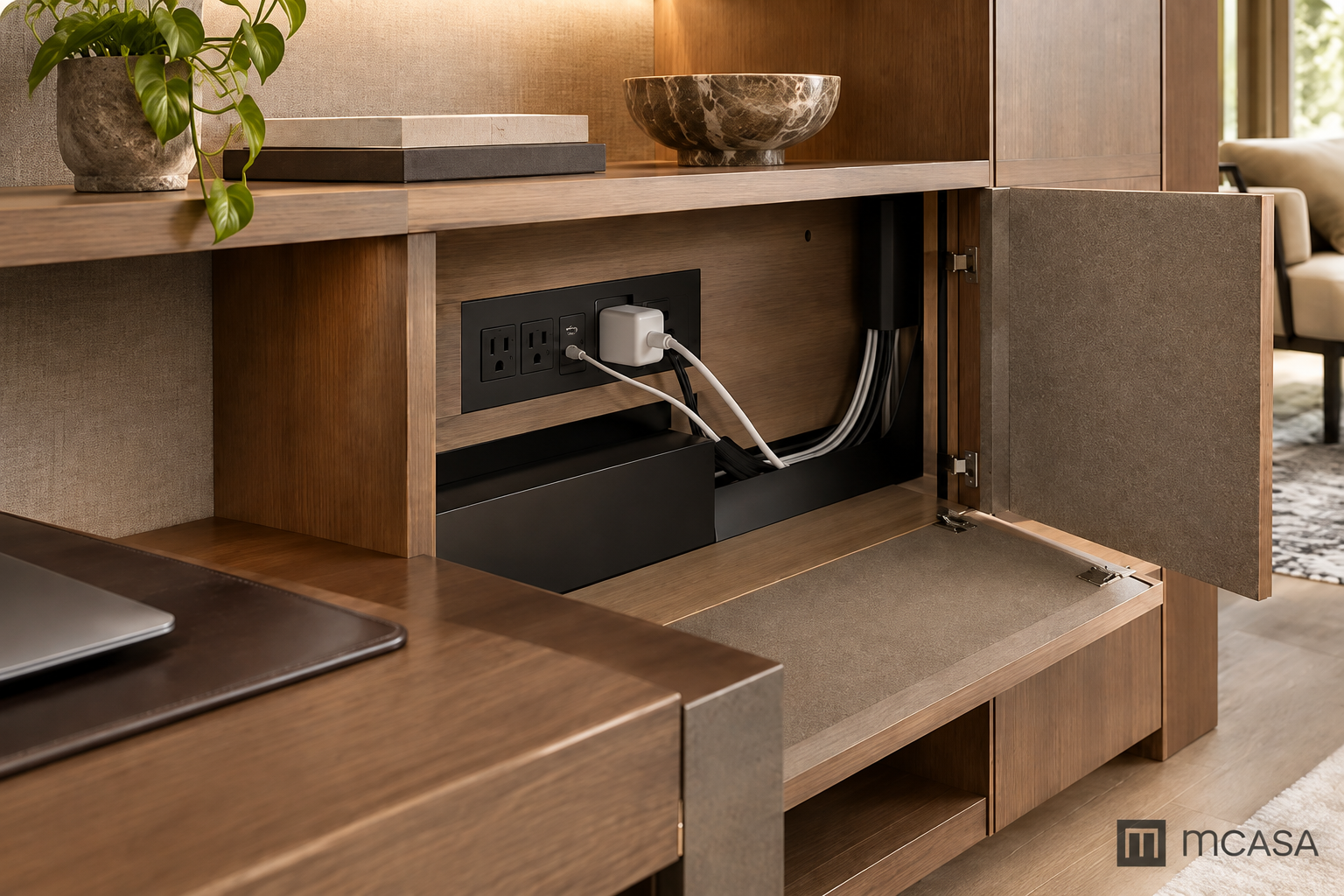
Why electrical planning matters in custom furniture
A beautiful cabinet can quickly feel inconvenient if plugs are hidden behind fixed panels, cables cross visible surfaces, or charging points are too far from where devices are used. Electrical planning should therefore be part of the furniture design conversation, not an afterthought.
This is especially important for home offices, media units, bedside furniture, and built-ins that integrate lighting or electronics.
Start by listing the devices that will actually be used
Before deciding where outlets should sit, list the equipment that needs power. For a home office, this may include a laptop, monitor, desk lamp, phone charger, printer, and router. For a TV cabinet, the list may include the television, streaming device, sound system, game console, and modem.
If you are planning a work area, see Custom Desks for an Organized Home Office for additional layout considerations.
Map the outlet locations before finalizing the furniture layout
Existing wall outlets should be measured and marked on the room plan. If the furniture will cover them, decide whether access needs to remain open or whether a dedicated cut-out, recessed panel, or internal power point is required.
Check outlet height
Outlet height affects whether a plug will sit comfortably behind furniture or collide with a shelf, back panel, or drawer.
Check outlet depth
Some adapters project farther from the wall than standard plugs. Leave enough clearance behind furniture so cables are not sharply bent or compressed.
Plan cable routes, not just cable holes
A single opening in the back panel is not always enough. Think about where each cable begins, where it needs to travel, and where it must exit. The cleaner the route, the less likely cables are to become tangled or visible.
- Keep power cables separated from frequently moved accessories.
- Provide access points near the devices that need them.
- Avoid routing cables across drawer slides or moving hardware.
- Leave service access so cables can be replaced later.
- Use the back or underside of furniture to keep visible surfaces clean.
TV cabinets need dedicated planning
Media furniture often has more cables than expected. Power, HDMI, internet, speakers, streaming devices, and consoles may all need different routes. Ventilation should also be considered so electronic equipment is not enclosed too tightly.
For a broader look at media furniture planning, see Designing a Custom TV Cabinet That Fits Your Space.
Desks should support both power and charging
For custom desks, think beyond the wall outlet. A well-planned desk may include a concealed power strip, cable tray, grommet, charging drawer, or accessible charging point near the work surface.
The goal is to reduce the number of loose cables crossing the desk while keeping chargers easy to reach.
Built-in storage may need hidden access panels
Built-ins that cover large wall areas can block outlets or data points if these are not considered early. Removable panels, concealed access zones, or open service cavities can preserve access without interrupting the overall design.
Related planning ideas can be found in Built-In Storage Ideas for an Organized Luxury Home.
Think about future devices
Furniture usually stays in place longer than electronics. Leave some flexibility for future devices, chargers, or cable standards. A slightly larger cable channel or accessible power point can make the furniture easier to adapt later.
Coordinate furniture planning with electrical work
If outlet positions can still be changed, furniture planning and electrical planning should happen together. This is especially useful in renovations, new homes, offices, and commercial interiors where built-ins are being made before the walls are completely finished.
Practical checklist before fabrication
| Area | What to Confirm | Goal |
|---|---|---|
| Outlets | Position and height | Remain accessible |
| Adapters | Depth behind furniture | No compression |
| Cables | Route from device to power | Hidden and serviceable |
| Electronics | Ventilation and access | Easy to maintain |
| Future use | Extra capacity | Flexible for new devices |
A simple 5-step workflow before fabrication
- List every powered device. Include daily-use electronics, occasional devices, chargers, routers, and integrated lighting.
- Measure existing outlets. Record position, height, and distance from corners or finished walls.
- Map cable paths. Decide where cables enter, travel, and exit without crossing drawers or moving hardware.
- Reserve service access. Keep adapters, power strips, and connection points reachable after installation.
- Review the plan with both furniture and electrical teams. Confirm the layout before fabrication begins.
Example: planning a custom TV cabinet
A TV cabinet may need power for the television, soundbar, streaming device, router, game console, and decorative lighting. Instead of relying on one opening behind the TV, plan separate routes for power, HDMI, and data cables. Leave ventilation around electronics and make sure the power strip can still be reached without removing fixed panels.
Before approving the final drawings, mark each device on the cabinet plan and trace its cable path. If any cable crosses a drawer, shelf support, or enclosed section with no access, revise the layout before fabrication.
Questions to discuss during a custom furniture consultation
- Which devices will be used every day?
- Where are the existing outlets and data points?
- Do any adapters need extra clearance?
- Should cables remain completely hidden?
- Will the furniture include integrated lighting?
- Does the design need future charging or device capacity?
For a wider preparation list, read Questions to Prepare Before a Custom Furniture Consultation.
Common planning mistakes
- Finalizing the cabinet layout before checking outlet positions.
- Allowing only one small cable hole for multiple devices.
- Placing drawers directly in front of outlets.
- Ignoring adapter size and cable bend radius.
- Creating built-ins with no future service access.
Frequently asked questions
Should outlets be hidden inside custom furniture?
They can be, as long as access, ventilation, and safe use are considered. The goal is not simply to hide them, but to keep them practical to reach when needed.
How much extra cable space should be planned?
There is no single number that suits every project. It depends on the number of devices, connector types, and how often equipment may change. In most cases, leaving a little extra service space is more useful than designing everything too tightly.
Can cable management be added after installation?
Some solutions can be added later, but integrated cable routes, cut-outs, and access panels are usually cleaner when planned before fabrication.
Good cable planning supports better furniture design
Power outlets and cable management may not be the most visible parts of custom furniture, but they strongly affect how the finished piece works. When electrical points, device locations, ventilation, and service access are considered early, the furniture can stay cleaner, easier to use, and more adaptable over time.